How to make any 3D object bounce, spin, wobble or squash and stretch
Give a coin, a chest, a sign or any other prop a bounce, spin, wobble, sway, float or squash-and-stretch animation, and download it as a GLB for Unity, Unreal, Godot or three.js. In your browser or from code.
October 25, 2026
Props are the easiest models to make and the most awkward to animate. A coin, a treasure chest or a potion bottle has no skeleton, so most people animate it by moving and rotating the whole thing in their engine. That gets you a coin that spins. It never gets you a chest that squashes when it lands, a jelly that wobbles or a sign that bends in the wind, because those need the mesh itself to change shape.
afk.ai's object rig fixes that. It fits a small skeleton inside any model and skins the mesh to it, so the object can bend, squash and stretch, and it comes with nine animations ready to play.
The object skeleton
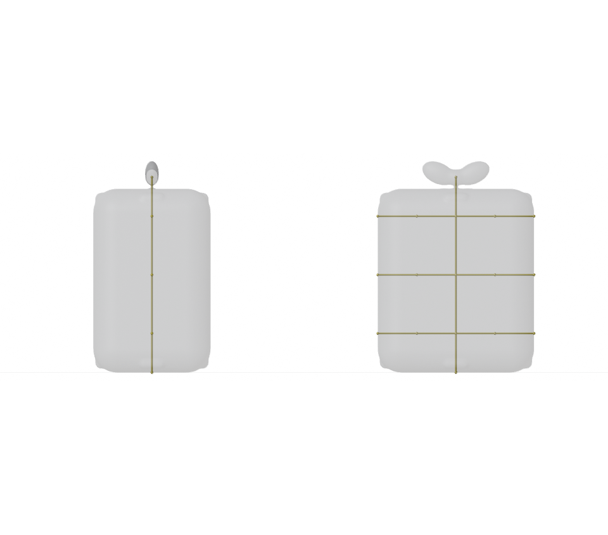
The object skeleton has 21 joints: a spine up the middle of the model and three rows of bones across it, fitted to your model. Because the mesh is skinned to those bones, the object bends and changes shape as it moves, which a plain move-and-rotate animation can't do.
The nine animations
| Animation | What it does | Length | Good for |
|---|---|---|---|
| Bounce | Bounces up and down | 0.8 s | Pickups, collectibles, idle items |
| Squash_Stretch | Squashes and stretches | 1 s | Cartoon props, buttons, anything springy |
| Spin | One full turn | 1 s | Coins, gems, rewards |
| Float | A slow bob up and down | 3 s | Hovering items, power-ups, floating islands |
| Wobble | A jelly-like wobble | 1.3 s | Something that just landed or got hit |
| Shake | A quick shake | 1 s | Locked doors, wrong answers, damage |
| Sway | A gentle sway | 2 s | Trees, signs, lamps, plants |
| Flag_Wave | A wave that runs through the object | 1 s | Flags, banners, cloth |
| Pop_In | Pops into view | 0.7 s | Spawning, unlocking, UI reveals |
Animate an object in your browser
- Open afk.ai/rig and drop in your model (GLB, glTF or FBX; OBJ, STL and zipped models are converted for you).
- When it asks what the model is, pick Object or prop. To animate only part of the model, choose Select a part first (more on that below).
- Preview the animations on your model.
- Download the rigged GLB with the animations you want.
Animate just one part of a model
Often only part of a prop should move: the flag and not its pole, the sign and not the post it hangs from, the plant and not its pot, the shade of a lamp, a crystal on top of a pedestal. On afk.ai/rig you can rig just that part and leave the rest of the model exactly where it is.
- Drop in your model, and when it asks what the model is, choose Select a part instead of Whole model.
- Draw around the part you want to animate, or click a piece to take all of it. Add and Remove refine the selection, Turn view lets you go round the model, and Select through to the back takes the faces you can't see as well.
- Press Continue and pick what the part is, such as Object or prop for a flag, a sign or a plant.
- The AI rigs only the selected part. Preview the animations, then download.
Everything you didn't select stays still and comes with the part in the same GLB, so a waving flag arrives on its pole and a swaying sign on its post, ready to drop into your scene. It works for any body type, not just objects: select a statue on its plinth or a character on its stand and only the figure moves.
Selecting a part is done on the website. The API rigs the whole model.
Animate objects from code
The afk.ai API rigs objects the same way, for a whole folder of props at once or for objects your players upload:
npx afk-rig coin.glb --type object --animations Spin,Bounce -o coin.rigged.glbFrom an AI agent, the afk-rig MCP server does the same with one tool call.
Play it in your engine
three.js
import * as THREE from 'three'
import { GLTFLoader } from 'three/addons/loaders/GLTFLoader.js'

const gltf = await new GLTFLoader().loadAsync('coin.rigged.glb')
scene.add(gltf.scene)

const mixer = new THREE.AnimationMixer(gltf.scene)
mixer.clipAction(THREE.AnimationClip.findByName(gltf.animations, 'Bounce')).play()

const clock = new THREE.Clock()
renderer.setAnimationLoop(() => {
  mixer.update(clock.getDelta())
  renderer.render(scene, camera)
})
Godot
Drop the GLB into your project. The imported scene has an AnimationPlayer with every animation by name, so $AnimationPlayer.play("Spin") plays one. Set the animation's loop mode in the import settings if you want it to repeat.
Unity
Install the glTFast package and drop the GLB into your project. Import it as a Generic rig (not Humanoid) and add the clips to an animator controller.
Unreal Engine
Unreal 5.1 and later imports GLB directly as a skeletal mesh with its animations.
Tips
- Combine both kinds of motion. Let your engine move the object along its path and let the rig do the shape: a coin that flies to the score counter while it spins, or a chest that drops in with Pop_In and settles with Wobble.
- Pick by feel. Bounce and Float read as "pick me up". Shake reads as "no". Sway reads as "alive but calm".
- One model, many props. Every object rig has the same nine animation names, so one animation setup works for all your pickups.
Questions
Can I animate only part of my model?
Yes. On afk.ai/rig, choose Select a part, draw around the part to animate and pick what it is. Only that part is rigged and animated, and the rest of the model stays still and comes with it in the download.
What kinds of objects work?
Props of all kinds: coins, gems, chests, crates, bottles, signs, flags, lamps, plants, furniture, food and toys. If it isn't a character or an animal, rig it as an object.
Can I use the animations in a commercial game?
Yes. The skeleton and animations are CC0 (public domain), and your model stays yours.
Can I animate characters and animals too?
Yes. afk.ai also rigs people, four-legged and hoofed animals, birds, dragons, dinosaurs, spiders, snakes, fish, kangaroos, frogs and ghosts, each with its own animations.
Rig your model
AI auto-rigging in your browser. Download a GLB with its animations.