Free · Runs locally · npm + MCP
Auto-rigging your AI can drive
afk-rig fits a skeleton to any GLB, then lets your AI look at the model, measure it, move joints and preview animations until the rig is right. Everything runs on your machine: no account, no upload, no per-rig fees.
npx afk-rig auto character.glb --skeleton human --animations Walk,Idle_A
Writes character.rigged.glb with the skeleton, skin weights and both animations.
What your AI sees, and what it fixes
Renders come back with the skeleton drawn on (left joints blue, right red, spine orange), rulers in model units and every joint's pixel position. Here auto-fit read the knight's cape as its legs. The AI sliced the mesh, cast rays, moved the hips, knees and spine, and checked a walk.
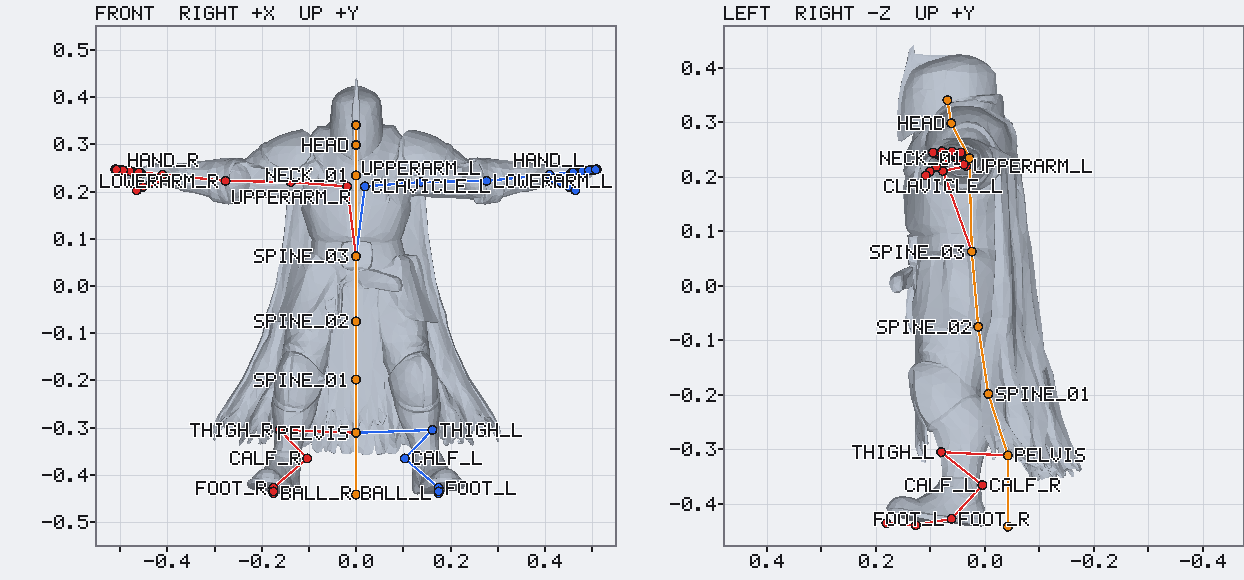
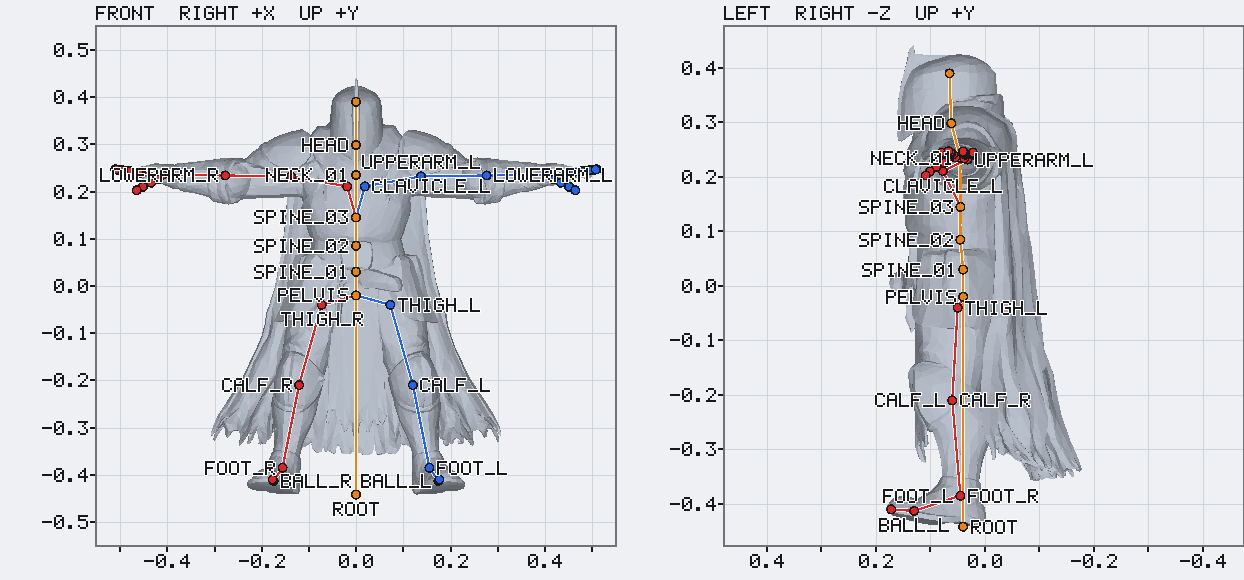
A deterministic start, then your AI takes it from there
Auto-fit
afk-rig measures the mesh and places every joint. Deterministic: the same model always gets the same skeleton.
Your AI looks
It renders the model from any side with the skeleton drawn on, rulers in model units and labeled joints.
Your AI adjusts
It measures the mesh, moves joints (mirrored if it likes), and previews animations to catch bad bends.
Export
A GLB with the skeleton, skin weights and the animations it picked. Materials and textures stay as they were.
How far to go is up to the AI. Auto-fit alone usually does a standard character in a T-pose or A-pose. The loop pays off on long coats, capes, characters facing backwards and unusual proportions.
Add it to your AI
Then ask something like: “Rig models/knight.glb with afk-rig, check it in a walk animation and export it with Walk, Run and Idle.”
claude mcp add afk-rig -- npx -y afk-rig mcp
{
  "mcpServers": {
    "afk-rig": { "command": "npx", "args": ["-y", "afk-rig", "mcp"] }
  }
}npx afk-rig start knight.glb --skeleton human npx afk-rig render knight.afk-rig.json --views front,left npx afk-rig set knight.afk-rig.json thigh_l=0.09,0.48,0.01 --mirror npx afk-rig export knight.afk-rig.json --out knight.rigged.glb --animations Walk,Idle_A
import { RigSession } from 'afk-rig'

const rig = await RigSession.start({ model: 'knight.glb', skeleton: 'human' })
await rig.export({ output: 'knight.rigged.glb', animations: ['Walk', 'Idle_A'] })Compared with cloud rigging APIs
| afk-rig | Cloud APIs (e.g. Tripo, Meshy) | |
|---|---|---|
| Where it runs | On your machine | Their servers |
| Cost | Free | Paid credits per rig |
| Account or API key | None | Required |
| Your model | Never leaves your machine | Uploaded |
| Joint placement | Auto-fit, then your AI can adjust any joint | Automatic only |
| Animations | 250+ clips included, CC0 | Presets from their library |
Based on Tripo's and Meshy's public API documentation as of October 2026.
Nine skeletons, 250+ animations
Questions
Is it really free?+
Yes. The package is MIT licensed and the skeletons and animations are CC0, so you can use rigged models in commercial games. There is no server to pay for because everything runs locally.
Which AI tools does it work with?+
Anything that speaks MCP (Claude Code, Cursor, Windsurf, Claude Desktop and others) gets it as tools, with renders returned as images. Agents that only have a shell can use the CLI, which prints JSON and writes PNG renders.
What files can it rig?+
GLB and glTF, including Draco and meshopt compressed files. Convert FBX or OBJ to GLB first. Models that are already rigged are read in their rest pose and get a fresh skeleton.
Does my model need to be in a T-pose?+
No. T-pose, A-pose or arms down all work out of the box, and animations adapt to the arm angle. Characters in action poses (mid-run, crouching) work too when your AI places the joints, since auto-fit assumes a standing pose. Where limbs touch the body, expect to fix some skin weights.
Do I need an AI to use it?+
No. "npx afk-rig auto model.glb --skeleton human" runs the auto-fit and exports in one go. The AI loop is there for models auto-fit gets wrong, like long coats, capes or characters facing backwards.
How good are the rigs?+
Auto-fit puts joints within about 2.4% of the model's height of where artists placed them on our test set of 29 characters. Skin weights come from the same solver as the afk.ai website: good for games, not hand-painted quality.