How to rig and animate a frog, a kangaroo, a shark or any other animal
Rig a 3D frog, toad, kangaroo, shark, whale, dog, horse, bird, dragon, dinosaur, spider, snake or ghost in your browser, and download it animated as a GLB for Unity, Unreal, Godot, Blender or three.js. Every body type afk.ai can rig and the animations each one comes with.
October 26, 2026
Most auto-riggers only rig people. Mixamo and the like want a humanoid standing in a T-pose, so a frog, a kangaroo or a shark either fails or comes back with a human skeleton forced into it: arms where the frog's front legs are, and nothing at all for the kangaroo's tail or the shark's fins. Rigging one by hand in Blender means hours of placing bones and painting weights.
afk.ai has a skeleton made for each of these bodies. You drop in your model and say what it is, and an AI finds its legs, tail, fins or wings, fits the matching skeleton, weights the skin and plays animations made for that animal. You download one GLB with all of it inside.
Everything afk.ai can rig
When afk.ai/rig asks "What is it?", pick the body type. What matters is the shape of the body, not the species: a wolf rigs as Four-legged, a whale as Fish and a toad as Frog.
| Pick | Rig it for | Animations | A few of them |
|---|---|---|---|
| Frog | Frogs and toads | 6 | Hop, Big_Jump, Croak, Tongue_Snap, Swim |
| Kangaroo | Kangaroos and wallabies | 6 | Hop, Hop_Fast, Box, Tail_Kick |
| Fish | Sharks, whales and fish | 12 | Swim Fast, Swim Turn Left, Lunge Bite, Thrash |
| Four-legged | Dogs, cats, foxes, wolves | 19 | Walk, Trot, Run, Fetch, Howl, Sit, Sleep |
| Hoofed | Horses, deer, cows | 14 | Walk, Trot, Run, Rear, Kick, Eating |
| Bird | Birds: wings and two legs | 10 | Flap, Glide, Take Off, Hop, Peck |
| Dragon | Wings and four legs | 11 | Fly Flap, Fly Hover, Roar, Fire Breath, Tail Swipe |
| Dinosaur or kaiju | T. rex, raptors, upright monsters with tails | 10 | Walk, Roar, Tail Attack, Swim |
| Spider or insect | Spiders, insects, crabs | 15 | Walk, Run, Sneak, Jump, Threat |
| Snake | Snakes, worms, serpents | 8 | Side winding, Coiled, Bite |
| Ghost | Ghosts and spirits | 6 | Drift, Float_Idle, Spook, Vanish, Wail |
| Humanoid | People, robots, zombies, anything on two legs | 172 | Walk, Sprint, Sword_Attack, Climb Ladder, Swim_Fwd |
| Object | Props: coins, chests, flags, signs | 9 | Bounce, Spin, Wobble, Squash_Stretch |
How to rig any of them
- Open afk.ai/rig and drop in your model (GLB, glTF or FBX; OBJ, STL and zipped models are converted for you).
- When it asks what the model is, pick its body type from the table above.
- The AI finds the body and fits the skeleton. Preview every animation on your model.
- Download the rigged GLB with the animations you want.
No model to hand? Each section below has a sample you can rig in one click.
How to rig a frog or toad
A frog is hard to rig because of how it sits. Its back legs fold up in a Z under its body and are longer than the whole frog when they kick out straight, and its front legs are short props. A four-legged skeleton expects legs that stand straight under the body, so a frog rigged as a dog bends in all the wrong places when it hops.
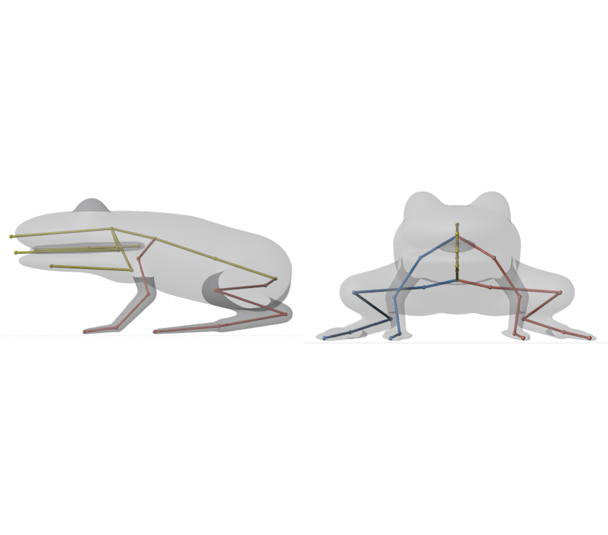
Pick Frog. The frog skeleton has 31 joints: the hips and a short spine; a head with a jaw, a throat that puffs out and a tongue that shoots out of the mouth; two short front legs from the upper arm to the hand; and two long back legs in four parts, thigh, shin, ankle and foot, so they can fold flat and stretch all the way out.
| Animation | What it does | Length |
|---|---|---|
| Idle | Sits still, head moving a little | 3 s |
| Hop | A short hop: the back legs fold, kick out and land | 0.7 s |
| Big_Jump | A higher, longer jump | 1.9 s |
| Croak | Puffs out its throat | 2 s |
| Tongue_Snap | Opens its mouth and snaps its tongue out | 1.2 s |
| Swim | Kicks with its back legs, the way frogs swim | 1 s |
Tips for frogs:
- Model it sitting, the way frogs usually are, with the back legs folded at its sides.
- A frog on a lily pad or a rock: choose Select a part first and draw around the frog, so only the frog moves and the lily pad comes with it in the download.
- A frog character that stands up on two legs, like a frog knight or a frog in a suit, rigs better as Humanoid and gets the 172 human animations.
Try it on our sample frog, or from code: npx afk-rig frog.glb --type frog -o frog.rigged.glb.
How to rig a kangaroo
A kangaroo is the animal other rigs get most wrong. It stands on two huge back legs, holds short arms up in front of its chest, and its tail is thick and long enough to lean on: when a kangaroo kicks, it rests its weight on its tail. A four-legged skeleton has nowhere to put that, and a human one has no tail at all.
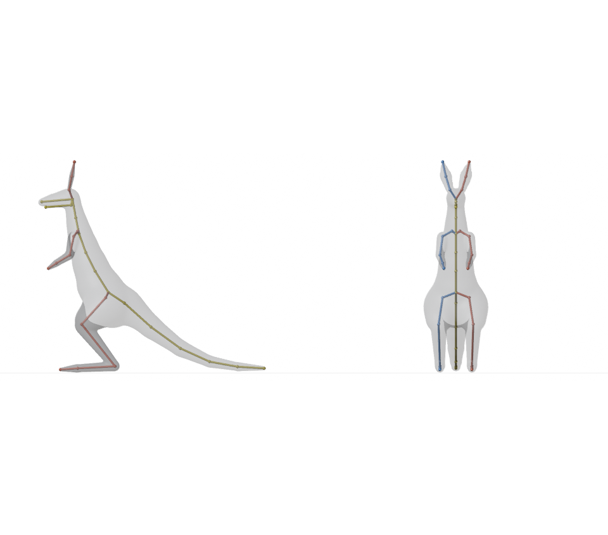
Pick Kangaroo. The kangaroo skeleton has 42 joints: a spine from the hips up to the neck; a head with a jaw and two tall ears that turn and twitch; short arms from the shoulder to the hand; long back legs in four parts, thigh, shin, foot and toe; and a five-bone tail.
| Animation | What it does | Length |
|---|---|---|
| Idle | Stands on its back legs and tail, ears twitching | 3 s |
| Hop | Hops on both back legs | 0.6 s |
| Hop_Fast | A quicker hop | 0.5 s |
| Look_Around | Turns its head and ears to look around | 4 s |
| Box | Throws punches with both arms | 2.8 s |
| Tail_Kick | Leans back on its tail and kicks out with both back legs | 2.5 s |
Tips for kangaroos:
- Model it standing up on its back legs, with the tail reaching back to the ground and the arms a little away from the chest.
- It works for wallabies too, and for other animals that stand and hop on two big back legs.
Try it on our sample kangaroo, or from code: npx afk-rig kangaroo.glb --type kangaroo -o kangaroo.rigged.glb.
How to rig a shark or any fish
Sharks have no legs, so a rigger that looks for arms and legs has nothing to hold on to. What makes a shark swim is its body: a wave that runs from behind the head to the tail fin. Rigged with a few bones it swims like a plank, so it needs a long chain of them.
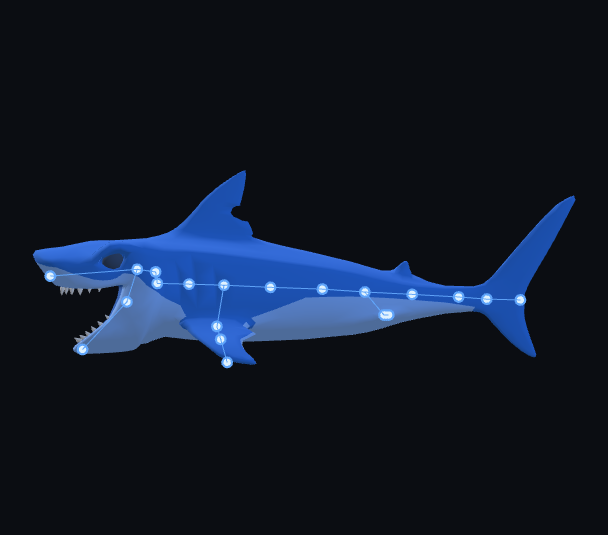
Pick Fish, which is the skeleton for sharks and whales too. It has 33 joints: a head with a jaw that opens wide, an eight-bone tail that runs from behind the head to the tail fin, and two pairs of fins, front and back, three bones each.
| Animation | What it does | Length |
|---|---|---|
| Idle | Hangs in the water, drifting gently | 2.5 s |
| Swim Horizontal | A steady swim, the tail sweeping from side to side | 1.4 s |
| Swim Fast | A faster swim with a bigger tail beat | 0.8 s |
| Swim Vertical | A slow swim, fins and head moving | 3.3 s |
| Swim Turn Left, Swim Turn Right | Turns while swimming | 1.3 s |
| Bite | Opens its jaw and bites | 3 s |
| Lunge Bite | Lunges forward and bites | 1.2 s |
| Thrash | Thrashes, jaw open | 1.7 s |
| Hit | Recoils from a hit | 0.8 s |
| Dead Floating | Floats lifeless | 3.3 s |
| Rest Pose | Holds still, straight | 0.2 s |
Tips for sharks and fish:
- Model it lying straight, fins out, mouth closed.
- Whales and goldfish rig as Fish too. One animal per file.
Try it on our sample shark, or from code: npx afk-rig shark.glb --type fish -o shark.rigged.glb. There's more on fish at auto-rig a fish.
Every other animal
Dogs, cats, foxes and wolves
Pick Four-legged: four legs with paws, a spine, a head with a jaw and ears, and a tail. It comes with walks, trots and runs, and dog things like Fetch, Howl, Sit, Play_Bow, Shake and Sleep. Try our sample fox, or see auto-rig a quadruped.
Horses, deer and cows
Pick Hoofed: longer legs down to the hoof, with Walk, Trot, Run, Rear, Kick, Eating and Sleep. Try our sample deer.
Birds
Pick Bird: two wings, a beak, a tail and two legs, with Flap, Glide, Take Off, Hop, Peck, Preen and Look Around. Try our sample eagle, or see auto-rig a bird.
Dragons
Pick Dragon: four legs, two wings with membrane fingers, horns and a long tail, with Fly Flap, Fly Glide, Fly Hover, Roar, Fire Breath and Tail Swipe. Try our sample dragon, or see auto-rig a dragon.
Dinosaurs and kaiju
Pick Dinosaur or kaiju for anything that walks upright on two legs with a big tail, like a T. rex, a raptor or a giant monster: Walk, Roar, Attack, Tail Attack, Swim, Hit and Death. Try our sample T. rex, or see auto-rig a dinosaur.
Spiders, insects and crabs
Pick Spider or insect for six or eight legs: Walk, Run, Sneak, Jump, Threat, Bite and Eating. Try our sample tarantula, or see auto-rig a spider.
Snakes and worms
Pick Snake for anything with no legs: Side winding, Coiled, Bite and even a Dance. Try our sample snake, or see auto-rig a snake.
Ghosts
Pick Ghost for anything that floats with no legs, like a ghost, a spirit or a wisp: Drift, Float_Idle, Sway, Spook, Wail and Vanish. Try our sample ghost.
People and props
Characters on two legs rig as Humanoid, with 172 animations. Props with no body at all (a coin, a chest, a flag) rig as Object, which makes them bounce, spin, wobble and squash: see how to animate 3D objects.
Rig animals from code
The afk.ai API rigs every one of these body types, for a folder of models at once or for models your players upload:
npx afk-rig frog.glb --type frog -o frog.rigged.glb
npx afk-rig kangaroo.glb --type kangaroo --animations Hop,Box -o kangaroo.rigged.glb
npx afk-rig shark.glb --type fish -o shark.rigged.glb
npx afk-rig types lists the body types and npx afk-rig types frog lists one type's animations. From an AI agent like Claude Code, the afk-rig MCP server does the same with one tool call. More in what you can build with the rigging API.
Use it in your game
The download is a standard GLB: a skinned mesh with its skeleton and every animation by name.
- Unity: install the glTFast package, drop the GLB in, and import it as a Generic rig (not Humanoid).
- Unreal Engine: 5.1 and later imports GLB directly as a skeletal mesh with its animations.
- Godot: drop the GLB into your project. Its
AnimationPlayerhas every animation by name, so$AnimationPlayer.play("Hop")makes the frog hop. - three.js: load it with
GLTFLoaderand play a clip with anAnimationMixer. There's a full example in the objects guide. - Blender: File, Import, glTF 2.0. The animations come in as actions you can edit.
Questions
Can Mixamo rig a frog, a kangaroo or a shark?
No. Mixamo's auto-rigger only handles two-legged humanoids. afk.ai has its own skeleton and animations for frogs, kangaroos, fish and sharks, and for four-legged and hoofed animals, birds, dragons, dinosaurs, spiders, snakes, ghosts and props.
What if my animal isn't in the list?
Pick the body type whose shape is closest. What matters is how many legs it has and how it stands, not what species it is: a wolf is Four-legged, a whale is Fish, a crab is Spider or insect, and a wallaby is Kangaroo.
What should my model look like?
One animal per file, in a natural standing (or for a frog, sitting) pose, with its legs, fins or wings a little away from the body. GLB, glTF and FBX work, and OBJ, STL and zipped models are converted for you.
Can I rig an animal that's part of a bigger scene?
Yes. On afk.ai/rig, choose Select a part and draw around the animal. Only that part is rigged and animated, and the rest of the model, like a frog's lily pad, stays still and comes with it in the download.
Can I use the rigged animal in a commercial game?
Yes. The skeletons and animations are CC0 (public domain), and your model stays yours.
Can I edit the animations afterwards?
Yes. The GLB opens in Blender with the skeleton and every animation as an action, so you can change the timing, add keys or make new animations on the same skeleton.
Rig your model
AI auto-rigging in your browser. Download a GLB with its animations.