AFK AI is now on Android: animate 3D characters and rig your own models on your phone
AFK AI - 3D Animation is out on Google Play. Pick one of 42 rigged 3D characters, play hundreds of moves, make a video for TikTok, Reels or Shorts in one tap, export an animated GLB, and rig your own 3D model with AI, all on your Android phone.
October 26, 2026
afk.ai has always run in the browser: drop in a 3D model, the AI rigs it, and you download it animated. Now it's on your phone too. AFK AI - 3D Animation is out on Google Play, free to download, for Android 7.0 and later.
The app does two things. It's a pocket studio of ready-made 3D characters you can make move and turn into videos, and it rigs your own 3D models with the same AI as afk.ai/rig, so they get every move too.
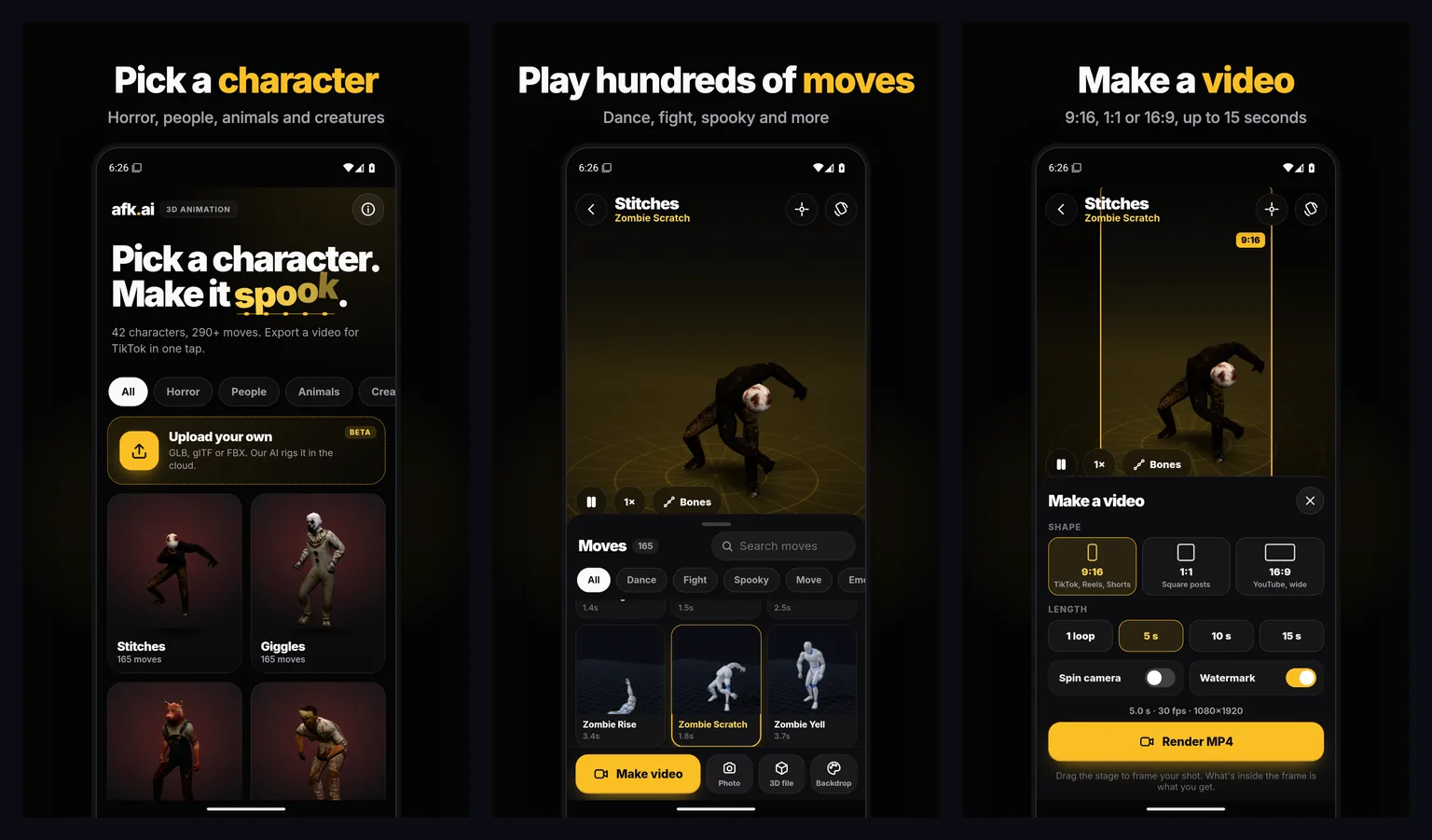
What's in the app
| Feature | What you can do |
|---|---|
| Characters | 42 rigged characters: zombies, clowns and other horror characters, everyday people, animals and creatures |
| Moves | Over 280 animations: dances, fights, spooky moves, walks and more, searchable by name |
| Videos | MP4 at 30 fps in 9:16, 1:1 or 16:9, one loop or 5, 10 or 15 seconds, made on your phone |
| Photos | A still of the stage at any moment, sharper than the screen |
| 3D files | Any character as a .glb with one move or all of them, for Blender, Unity, Unreal, Godot or three.js |
| Your own models | Upload a GLB, glTF or FBX and the AI rigs it in the cloud, with the same moves as every other character |
Make a 3D character move
- Open the app and pick a character. Filter by Horror, People, Animals or Creatures, or scroll through all of them.
- Browse the moves and tap one to play it on the character. Search by name to find a dance or a fight move fast.
- Change the speed (half, quarter or double), turn on Bones to see the skeleton, and drag the stage to frame your shot.
The studio works in portrait and in landscape: turn your phone and it turns with it.
Make a video for TikTok, Reels or Shorts
Tap Make video and choose:
- Shape: 9:16 for TikTok, Reels and Shorts, 1:1 for square posts, or 16:9 for YouTube.
- Length: one loop of the move, or 5, 10 or 15 seconds.
- Spin camera: the camera circles the character while it moves.
- Watermark: on or off.
- Backdrop: Night, Sunset, Studio, or Green screen to put the character into your own footage in any video editor.
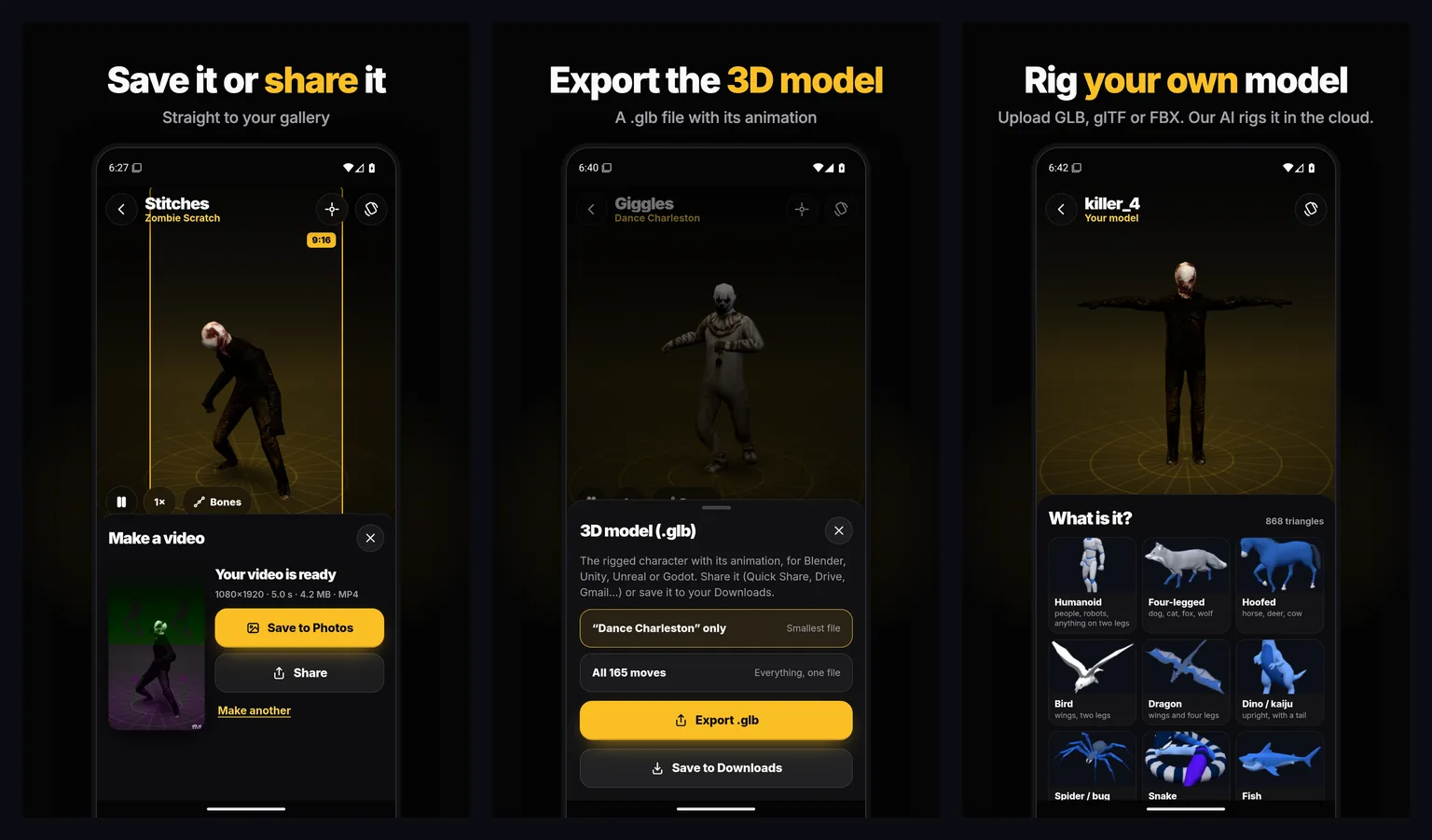
The video is rendered on your phone, so nothing is uploaded. When it's ready, save it to your gallery or share it straight to another app. For a still instead, tap Photo.
Export an animated 3D model
Tap 3D file on any character to export it as a .glb: just the move that's playing (the smallest file) or every move in one file. Share it to your computer or save it to your Downloads, then open it in your 3D app or game engine:
- Blender: File, Import, glTF 2.0. Each move comes in as an action.
- Unity: with the glTFast package, as a Generic rig.
- Unreal Engine: 5.1 and later import GLB directly as a skeletal mesh with its animations.
- Godot: drop it into your project and play a move by name from its
AnimationPlayer. - three.js: load it with
GLTFLoaderand play a clip with anAnimationMixer.
Rig your own 3D model on your phone
Tap Upload your own and pick a GLB, glTF or FBX file from your phone (up to 150 MB). Then:
- Say what it is: Humanoid, Four-legged, Hoofed, Bird, Dragon, Dinosaur or kaiju, Spider or insect, Snake, Fish, Kangaroo, Frog, Ghost or Object.
- Rig all of it, or choose Select a part and draw around the part that should move with your finger. The rest of the model stays still and comes with it.
- The AI rigs it on our cloud GPU. You watch the skin weights being painted onto your model while it works.
- Your model plays every move made for its body type, and you can make videos, photos and 3D files of it like any other character.
Every model you rig is saved on your phone under Your models, with all its moves, so you can open it again any time. Cloud rigging needs a sign-in with Google, and it's the same account as on afk.ai: sign in with the same Google account in both places and your plan is the same in both.
For what each body type can do, see how to rig a frog, a kangaroo, a shark or any other animal and how to animate 3D objects.
Questions
Is AFK AI free on Android?
Yes, it's free to download from Google Play. Picking characters, playing moves, making videos and photos, and exporting 3D files all work without an account.
Which phones does it work on?
Android phones and tablets with Android 7.0 or later. Videos are made on the phone itself, so a newer phone renders them faster.
Do I need an account?
Only to rig your own models in the cloud. Sign in with Google from the Account page (the person button on the home screen). You can sign out or delete your account from the same page.
Can I use the videos and 3D files in my own projects?
Yes. The characters and animations are CC0 or CC-BY licensed, with full credits in the app, and a model you upload stays yours.
Can I rig a model I made in Blender?
Yes. Export it from Blender as GLB, glTF or FBX, copy it to your phone, and tap Upload your own. One character per file works best, standing in a natural pose with its arms or legs a little away from the body.
Is it the same as afk.ai in the browser?
The rigging is the same AI, the same body types and the same animations as afk.ai/rig, and your account and plan are shared. The app adds the ready-made characters, videos and photos made on your phone, and Your models saved on the device.
Get AFK AI on your phone
3D characters, hundreds of moves and videos in one tap. Free on Google Play.