PluginsRoblox Studio
AFK AI for Roblox Studio: Auto-rig plugin
Rig and animate a 3D model without leaving Roblox Studio. Pick a model file on your computer, click Rig, and about a minute later you get the rigged, animated model to bring in with Studio's own Import 3D.
Version 0.1.0 · 42.2 KBafk-ai-roblox-studio-0.1.0.rbxmx
Runs on Windows and macOS
AFK AISign out
you@example.com · 2 rigs left this month
Three steps, inside Roblox Studio
- Roblox Studio
AFK AISign out
you@example.com · 2 rigs left this month
Choose a model file...Body typeHuman▾All animationsRig onlyFacingAuto ▾Rig1Choose a model file
A .glb, .gltf or .fbx from your computer, picked in the AFK AI panel.
- Roblox Studio
AFK AISign out
you@example.com · 2 rigs left this month
hero.fbxBody typeHuman▾All animationsRig onlyFacingAuto ▾RigRigging: adding the animations…
2Click Rig
Pick the body type and click Rig. The panel shows how it's going.
- Roblox StudioWorkspaceImport 3D · Rig Type: Customhero_rigged3
Import it
Open the download link, then bring the file in with Import 3D, Rig Type Custom.
Install
- Download afk-ai-roblox-studio-0.1.0.rbxmx.
- In Studio, open the Plugins tab and click Plugins Folder. Put the file in the folder that opens.
- Restart Studio. A Rig with AFK AI button appears in the Plugins tab.
- The first time it connects, Studio asks whether AFK AI may reach AFK AI's rigger and Google's sign-in. Choose Allow for each.
You can change those answers later: in the Plugins tab, Manage Plugins, then AFK AI.
- File
- afk-ai-roblox-studio-0.1.0.rbxmx
- Version
- 0.1.0
- Size
- 42.2 KB
- Runs on
- Windows and macOS
- SHA-256
- 63ad6daa224dc9ce632cbe6e917f0fdda7cec2fb7cda3c958cddbf80c7f47492
Requirements
- Roblox Studio, on Windows or Mac
- Your permission for AFK AI to connect (Studio asks the first time)
- An afk.ai account: you sign in with Google. A free account gets 3 rigs a month.
- An internet connection: the rigging happens on AFK AI's servers.
Use it
- Click Rig with AFK AI to open the AFK AI panel. Click Sign in, copy the link it shows, and open it in your browser. Sign in with Google there.
- The page shows a sign-in code. Copy it, paste it into I have a sign-in code in the panel, and click Use code. The panel shows your email and how many rigs you have left this month.
- Click Choose a model file... and pick your model. Choose its body type, then All animations or Rig only, and leave facing on Auto.
- Click Rig. When it's done, copy the download link from the panel and open it in your browser: it downloads the rigged model.
- In Studio, choose File > Import 3D (just Import in some versions) and pick the downloaded file. Set Rig Type to Custom, then click Import.
- For the animations, select the model, open the Animation Editor (Avatar tab), and in its ⋯ menu choose Import, then From File, and pick the same file.
Each rig uses one of your account's rigs, the same as on afk.ai/rig. A free account gets 3 a month, with the free animations; a plan gives you more rigs and every animation. A rig that fails doesn't count.
What you get back
- In your place
- After Import 3D, the model is in the Workspace with its bones, as a Custom rig.
- Animations
- The Animation Editor imports every animation in the file and saves them in your place. Switch between them with Load.
- In a game
- To play an animation in a published game, publish it from the Animation Editor first, as Roblox requires for every animation.
- The link
- Works for 24 hours. Anyone who has it can download the model, so keep it to yourself.
Limits worth knowing
- You bring the result in yourself: a plugin can't save a file or start Studio's 3D importer, so AFK AI gives you a download link, and Import 3D does the rest. It takes about a minute.
- It sends a model file from your computer: a
.glb, a.gltfwith everything embedded, or an.fbx, up to 50 MB. A plugin can't export what's already in your place. - You copy the sign-in and download links by hand: a plugin can't open your browser or use your clipboard.
- The model comes in as a Custom rig with AFK AI's own skeleton, not as an R15 avatar. Roblox takes meshes of up to 20,000 triangles.
Questions
Why doesn't the plugin put the model in my place itself?
Roblox doesn't let a plugin save a file or start Studio's 3D importer. So AFK AI gives you a download link, and Import 3D brings the model in, bones and all.
Can I rig a model that's already in my place?
Not from the plugin: Studio has no way for a plugin to export a place's model as a file. Export it as .fbx or .glb from the app you made it in, then choose that file.
Do the animations work in a published game?
Yes, once you publish each one from the Animation Editor, as Roblox requires for every animation.
Is it an R15 avatar?
No. It comes in as a Custom rig, with the skeleton AFK AI made for its body type, and plays its own animations.
Is AFK AI for Roblox Studio free?
It's free to download. Each rig uses one of your afk.ai account's rigs, the same as on afk.ai/rig: a free account gets 3 a month, with the free animations, and a plan gives you more rigs and every animation. A rig that fails doesn't count.
Does my sign-in end up in my files?
No. Your sign-in is kept on your computer, in your own user settings, never in a scene or project file, so sharing or committing your work never shares your account. Sign out forgets it.
Can I use the result in a commercial game?
Yes. The animations are CC0 (public domain), and your model stays yours.
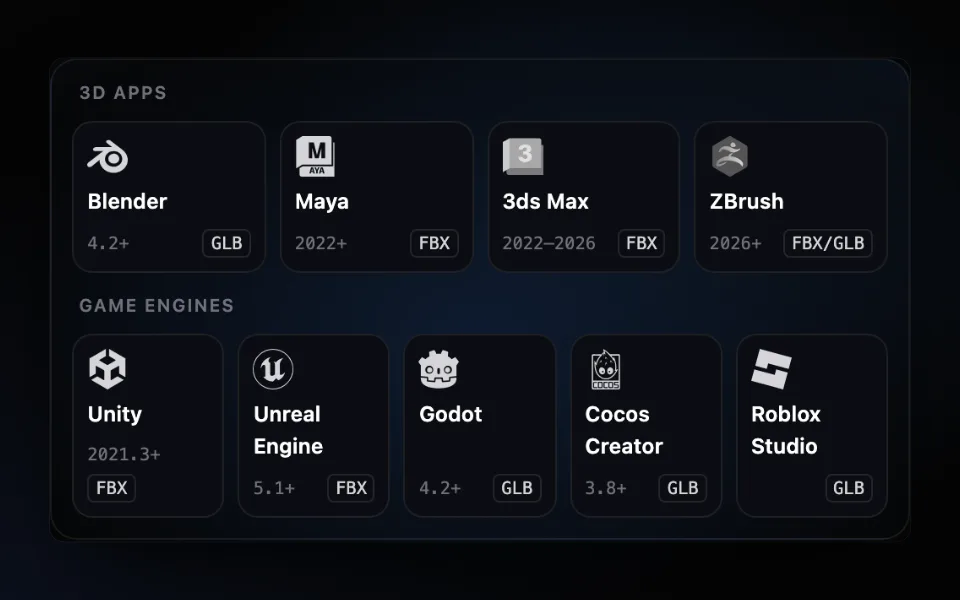
AFK AI for your other apps
All plugins →- BlenderA rigged copy with its animations appears next to your model. Blender 4.2 and later.Get the plugin →
- MayaRig the selection from the AFK AI menu; the rigged copy gets a namespace of its own. Maya 2022 and later.Get the plugin →
- 3ds MaxRig the selection from the AFK AI menu; the rigged copy gets a layer of its own. 3ds Max 2022 to 2026.Get the plugin →
- ZBrushRig your sculpt and save it as FBX or GLB, ready to open in Blender. ZBrush 2026 and later.Get the plugin →
- UnityA rigged FBX next to your model, Humanoid for people, with its clips set to loop. Unity 2021.3 and later.Get the plugin →
- Unreal EngineRight-click a mesh to get a skeletal mesh with its animations. Unreal Engine 5.1 and later, nothing to compile.Get the plugin →
- GodotA rigged GLB next to your model, its looping animations already set. Godot 4.2 and later.Get the plugin →
- Cocos CreatorA rigged, animated GLB added to your assets, next to the original. Cocos Creator 3.8 and later.Get the plugin →


Rather rig in your browser?
afk.ai/rig rigs the same way, with a preview, fixes and every download format.