AFK AI plugins
Auto-rig without leaving your app
Select a model, click Rig, and about a minute later it's back in your scene with a skeleton and animations. Free plugins for 9 3D apps and game engines, signed in with your afk.ai account.
Pick your app
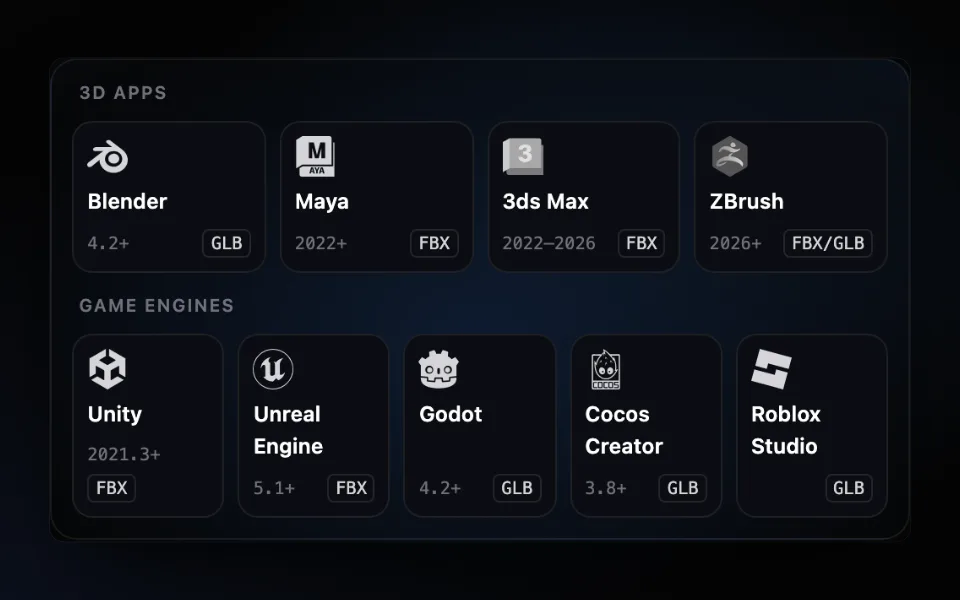
- 3D appBlenderVersion 0.1.0 · 21.8 KBA rigged copy with its animations appears next to your model. Blender 4.2 and later.Get the plugin →
- 3D appMayaVersion 0.1.0 · 32.4 KBRig the selection from the AFK AI menu; the rigged copy gets a namespace of its own. Maya 2022 and later.Get the plugin →
- 3D app3ds MaxVersion 0.1.0 · 32.7 KBRig the selection from the AFK AI menu; the rigged copy gets a layer of its own. 3ds Max 2022 to 2026.Get the plugin →
- 3D appZBrushVersion 0.1.0 · 27.6 KBRig your sculpt and save it as FBX or GLB, ready to open in Blender. ZBrush 2026 and later.Get the plugin →
- Game engineUnityVersion 0.1.0 · 28.5 KBA rigged FBX next to your model, Humanoid for people, with its clips set to loop. Unity 2021.3 and later.Get the plugin →
- Game engineUnreal EngineVersion 0.1.0 · 27.3 KBRight-click a mesh to get a skeletal mesh with its animations. Unreal Engine 5.1 and later, nothing to compile.Get the plugin →
- Game engineGodotVersion 0.1.0 · 16.1 KBA rigged GLB next to your model, its looping animations already set. Godot 4.2 and later.Get the plugin →
- Game engineCocos CreatorVersion 0.1.0 · 28.6 KBA rigged, animated GLB added to your assets, next to the original. Cocos Creator 3.8 and later.Get the plugin →
- Game engineRoblox StudioVersion 0.1.0 · 42.2 KBRig a model file, then bring it in with Studio's Import 3D, bones and animations included.Get the plugin →


How every plugin works
- 1
Sign in once
Click Sign in in the plugin and sign in with Google on afk.ai. You stay signed in on that computer.
- 2
Select and click Rig
Pick the model, what kind of body it has (human, four-legged, dragon, spider, object and more) and whether you want its animations.
- 3
It comes back rigged
About a minute later, a rigged copy with its animations is in your scene or project, next to the original.
Good to know
- What's sent
- Only the model you rig: the selection, exported for you in a 3D app, or the model's own file in a game engine. Up to 50 MB.
- Where it's rigged
- On AFK AI's servers, by the same AI as afk.ai/rig. The plugin is small and does no rigging itself.
- Body types
- 15 of them, from people and four-legged animals to dragons, spiders, fish and props, each with animations made for its skeleton.
- Your rigs
- Each rig uses one of your account's rigs, the same as on afk.ai/rig. A free account gets 3 a month, with the free animations; a plan gives you more rigs and every animation. A rig that fails doesn't count.
Using MetaTailor?
MetaTailor has no plugin system, so there's no AFK AI plugin for it. The two still work together: rig first, then dress.
- Rig the character with the Human body type on afk.ai/rig, and download it as FBX. (The Maya, 3ds Max, Unity and Unreal plugins save an FBX too.)
- In MetaTailor, import that FBX as your avatar. It doesn't open .glb files yet.
- Dress the character, then export it from MetaTailor as FBX.
MetaTailor fits clothes to two-legged, human-shaped characters, so it's for the Human body type only. Check that one character's animations come through MetaTailor's export before you rely on it.
 Step by stepAuto-rig plugins for nine 3D apps and game engines: Blender, Maya, Unity, Unreal and moreOne AFK AI plugin for each of nine apps. Select a model, click Rig, and about a minute later it's back in your scene or project, rigged and animated.Read the guide →
Questions
Are the plugins free?
Yes, they're free to download. Each rig uses one of your afk.ai account's rigs, the same as on afk.ai/rig: a free account gets 3 a month, with the free animations, and a plan gives you more rigs and every animation. A rig that fails doesn't count.
Do I need an afk.ai account?
Yes. Every plugin signs in with your afk.ai account (you sign in with Google), and the rigging happens on AFK AI's servers. Your sign-in is kept on your computer, never in a scene or project file, so sharing a project never shares your account.
How long does a rig take?
About a minute. The plugin shows the progress, and in every app but ZBrush you can keep working meanwhile.
Is it the same as rigging on afk.ai/rig?
The same AI rigs it, with the same skeletons and animations, and it counts the same way. On afk.ai/rig you can also preview, fix and adjust a rig before you download it; a plugin brings the result straight into your app.
Is there a plugin for my app?
There are plugins for Blender, Maya, 3ds Max, ZBrush, Unity, Unreal Engine, Godot, Cocos Creator and Roblox Studio. For any other app, rig on afk.ai/rig and download a GLB or FBX: most 3D apps and engines open one or the other.
Can I use what it makes in a commercial game?
Yes. The animations are CC0 (public domain), and your model stays yours.
Rather rig in your browser?
afk.ai/rig rigs the same way, with a preview, fixes and every download format.