PluginsZBrush

AFK AI for ZBrush: Auto-rig plugin
Rig the model you sculpted and get it back rigged and animated, ready for Blender, Maya, Unreal, Unity or any app that reads FBX or GLB. ZBrush has no skeletons, so the rigged model is saved as a file where you choose, and the plugin offers to open it in Blender.
Version 0.1.0 · 27.6 KBafk-ai-zbrush-0.1.0.zip
Runs on Windows and macOS
Saved Hero_rigged.fbx
Open it in Blender?
AFK AISign out
you@example.com · 2 rigs left this month
Body typeDone: Hero_rigged.fbx
Three steps, inside ZBrush
- ZBrushTool: Hero1
Open your tool
A PolyMesh 3D. Send every visible SubTool, or only the selected one.
- ZBrush
AFK AISign out
you@example.com · 2 rigs left this month
Body typeHuman▾All animationsRig onlyFacingAuto ▾Selected SubTool onlyRigRigging: adding the animations…
2Click Rig
In the AFK AI palette, pick the body type, click Rig and choose where to save it. ZBrush waits about a minute.
- ZBrushTool: Hero
Saved Hero_rigged.fbx
Open it in Blender?
YesNo3Get the rigged file
The folder opens with the rigged FBX or GLB selected, and ZBrush offers to open it in Blender, animations and all.
Install
- Download afk-ai-zbrush-0.1.0.zip and unzip it. Keep
AFK_AI.pyand theafk_ai_zbrushfolder side by side. - In ZBrush, choose Preferences > Asset Directory > Open Directory, and copy both into the folder that opens.
- Restart ZBrush. An AFK AI palette appears on the right. It's also in the palette list at the top.
No palette? Choose ZScript > Python Scripting > Load and pick AFK_AI.py. That works any time, for as long as ZBrush stays open.
- File
- afk-ai-zbrush-0.1.0.zip
- Version
- 0.1.0
- Size
- 27.6 KB
- Runs on
- Windows and macOS
- SHA-256
- e45ebb246b7c2abc9a2fbd7168205269ff004d20908c62f2eb659c1c18c93292
Requirements
- ZBrush 2026 or later, on Windows or Mac
- Blender, if you'd like ZBrush to open the result there (optional)
- An afk.ai account: you sign in with Google. A free account gets 3 rigs a month.
- An internet connection: the rigging happens on AFK AI's servers.
Use it
- In the AFK AI palette, click Sign in. Your browser opens afk.ai: sign in with Google there. ZBrush waits meanwhile, and says when you're signed in.
- Open the tool to rig. It must be a PolyMesh 3D: for ZSpheres and primitives, click Tool > Make PolyMesh3D first.
- Choose its Body type. Turn on Rig only for just the skeleton, and Selected SubTool only to send one SubTool instead of every visible one.
- Click Rig, choose where to save it and the type, FBX for most apps or GLB, then click OK to confirm.
- ZBrush exports the model and waits about a minute, with the progress in the bar at the top. Then the folder opens with the rigged file selected.
If the browser can't get back to ZBrush (a firewall, or ZBrush on another computer), the afk.ai page shows a sign-in code. Copy it, click Sign-in code in the palette, and say Yes to using the code you copied. A code works for an hour.
Each rig uses one of your account's rigs, the same as on afk.ai/rig. A free account gets 3 a month, with the free animations; a plan gives you more rigs and every animation. A rig that fails doesn't count.
What you get back
- A file
- The rigged model as FBX or GLB, with its animations, where you chose to save it.
- In Blender
- If Blender is installed, ZBrush offers to open the file there, with its animations.
- Your tool
- Not changed. The rigged model lives in the file: ZBrush has no skeletons to hold it.
- What's sent
- The visible SubTools, or the selected one, at their current subdivision level, with their UVs and polypaint. Not textures, materials or hidden SubTools.
Limits worth knowing
- ZBrush 2026 or later only: older versions have no Python, so the plugin can't run there. In an older ZBrush, export an FBX or OBJ and rig it on afk.ai/rig, or in Blender with AFK AI for Blender.
- The rigged model is saved as a file. It doesn't come back into ZBrush, which has no skeletons.
- ZBrush is busy while it waits, about a minute: its scripting can't wait in the background. To stop waiting, hold the mouse button down for a couple of seconds. The rig carries on, and Get the last rig again fetches it later.
- Textures and materials aren't sent, only UVs and polypaint.
- Models up to 50 MB: rig a lower subdivision level, a copy reduced with Zplugin > Decimation Master, or one SubTool at a time.
Questions
Does it work in ZBrush 2025 or older?
No. ZBrush got Python in 2026, and the plugin needs it. In an older ZBrush, export the model as FBX (Zplugin > FBX ExportImport) or OBJ (Tool > Export), and rig it on afk.ai/rig or in Blender with AFK AI for Blender.
Why doesn't the rigged model come back into ZBrush?
ZBrush has no skeletons or animation, so there's nowhere in it for a rig to go. AFK AI saves the rigged model as an FBX or GLB for the app you animate in, and offers to open it in Blender.
Why is ZBrush busy while it rigs?
ZBrush's Python has no way to wait in the background, so the plugin waits in the foreground with a progress bar, for about a minute. Hold the mouse button down for a couple of seconds to stop waiting; the rig carries on, and Get the last rig again fetches it.
Are my textures sent?
No. The SubTools go at their current subdivision level with their UVs and polypaint, but not textures or materials. Hidden SubTools stay behind.
Is AFK AI for ZBrush free?
It's free to download. Each rig uses one of your afk.ai account's rigs, the same as on afk.ai/rig: a free account gets 3 a month, with the free animations, and a plan gives you more rigs and every animation. A rig that fails doesn't count.
Does my sign-in end up in my files?
No. Your sign-in is kept on your computer, in your own user settings, never in a scene or project file, so sharing or committing your work never shares your account. Sign out forgets it.
Can I use the result in a commercial game?
Yes. The animations are CC0 (public domain), and your model stays yours.
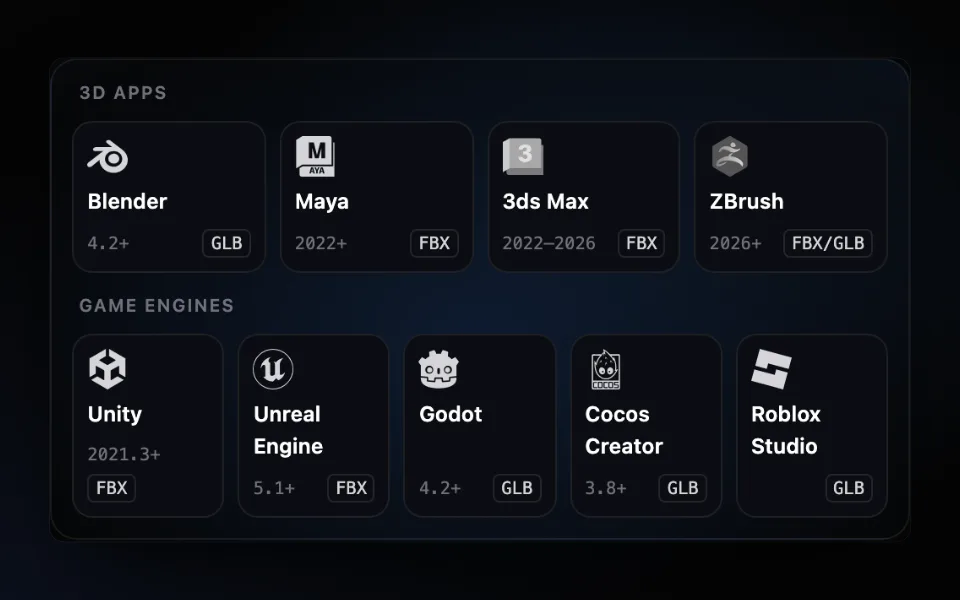
AFK AI for your other apps
All plugins →- BlenderA rigged copy with its animations appears next to your model. Blender 4.2 and later.Get the plugin →
- MayaRig the selection from the AFK AI menu; the rigged copy gets a namespace of its own. Maya 2022 and later.Get the plugin →
- 3ds MaxRig the selection from the AFK AI menu; the rigged copy gets a layer of its own. 3ds Max 2022 to 2026.Get the plugin →
- UnityA rigged FBX next to your model, Humanoid for people, with its clips set to loop. Unity 2021.3 and later.Get the plugin →
- Unreal EngineRight-click a mesh to get a skeletal mesh with its animations. Unreal Engine 5.1 and later, nothing to compile.Get the plugin →
- GodotA rigged GLB next to your model, its looping animations already set. Godot 4.2 and later.Get the plugin →
- Cocos CreatorA rigged, animated GLB added to your assets, next to the original. Cocos Creator 3.8 and later.Get the plugin →
- Roblox StudioRig a model file, then bring it in with Studio's Import 3D, bones and animations included.Get the plugin →

Rather rig in your browser?
afk.ai/rig rigs the same way, with a preview, fixes and every download format.